 Polski
 English
Free service software for configuring F&F Modbus devices
Supports MB series transducers and MR modules.
Configuration of communication and device parameters.
Test reading of values.
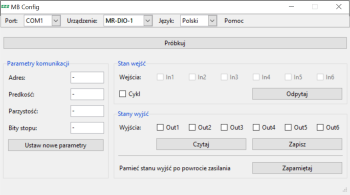
MB Config is a service programme designed to support MB series measurement transducers and MR expansion modules that communicate via the Modbus protocol.
Communication
Communication between the module and a PC via theCN-USB-485 USB converter
Instructions
1. Port: Select the correct COM port for the connected converter (check in Device Manager).
2. Language: Select the correct language.
3. Device: Select the correct device.
4. Click ‘Test’ and, after entering the communication parameters, click ‘Check device’.
5. Once the device has been detected, you can read and write parameters. If this fails, try resetting the device’s communication parameters to their factory settings (the procedure is described in the manual).
Licence
Free software.

Free service software for configuring F&F Modbus devices
Supports MB series transducers and MR modules.
Configuration of communication and device parameters.
Test reading of values.